


Open Any App on Your TV from Your Phone

Kliky lists the apps installed on your TV. Find one by name, pin the ones you use every day and open them in a tap, without scrolling through the TV’s Home screen.

Download on the App StoreGet it on Google Play
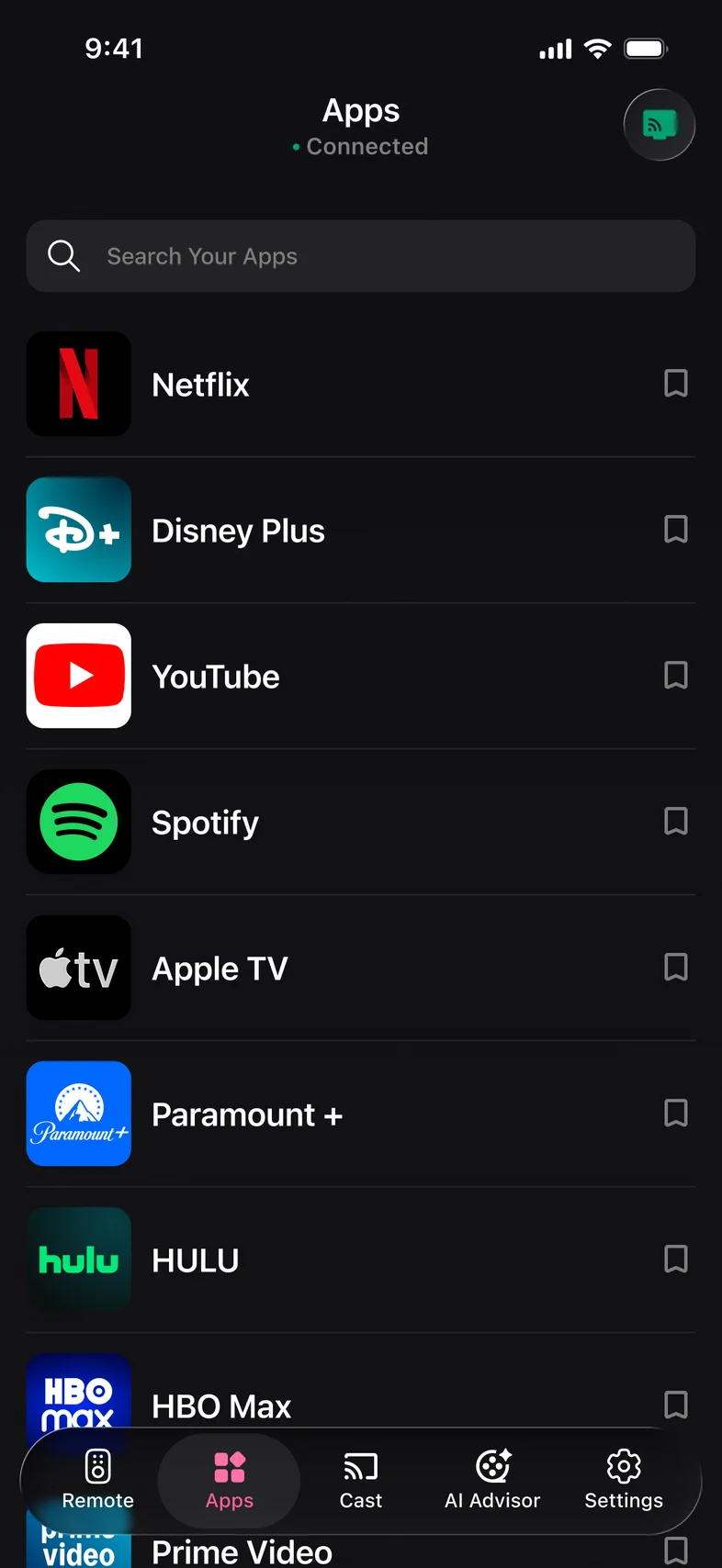
Kliky app: list of apps installed on the TV

Why open TV apps from your phone

  • The whole list in your hand

    Every app and channel installed on the TV, shown on your phone with its name and icon.

  • Favorites on top

    Pin the apps you open every day so they are the first thing you see.

  • Search by name

    Type a few letters to find an app instead of scrolling past rows of recommendations on the TV.

How to open a TV app from your phone

  1. Step 1

    Connect to your TV

    Put the phone and the TV on the same Wi‑Fi and pick the TV in Kliky.

  2. Step 2

    Open the Apps tab

    Kliky reads the list of apps installed on the TV.

  3. Step 3

    Tap an app

    It opens on the TV. Pin it to keep it at the top of the list.

What the Apps tab shows

The Apps tab shows the apps that are installed on your TV: Netflix, YouTube, Disney+, Spotify and whatever else you have added. On a Roku these are your channels. The list comes from the TV itself, so it matches what you would see on its Home screen.

Kliky opens apps that are already on the TV. Installing a new app is still done in the TV’s own app store, and you can use the remote and the keyboard in Kliky to get through it faster.

Tap the pin next to an app to keep it at the top. Use the search field above the list when the TV has dozens of apps. The most common streaming apps also sit as shortcuts on the remote screen itself.

Why it is faster than the TV’s Home screen

Home screens on smart TVs put recommendations and adverts between you and your apps, and the row of apps often needs a long scroll to the right. Opening the app from your phone skips the Home screen: the TV goes straight to the app.

TV apps questions

Can I open Netflix or YouTube on my TV from my phone?

Yes, if the app is installed on the TV. Open the Apps tab in Kliky and tap it; the app opens on the TV.

Can Kliky install apps on my TV?

No. Kliky opens the apps that are already installed. New apps are added in the TV’s own app store.

Why is an app missing from the list?

The list shows what the TV reports as installed. If an app is not on the TV, it will not be listed. If you just installed it, reconnect to the TV to refresh the list.

Does it work with Roku channels?

Yes. On a Roku the Apps tab lists your channels and opens them the same way.

Your TV apps, one tap away

Scan to download Kliky and open TV apps from your phone.

Download on the App StoreGet it on Google Play
Scan to download